
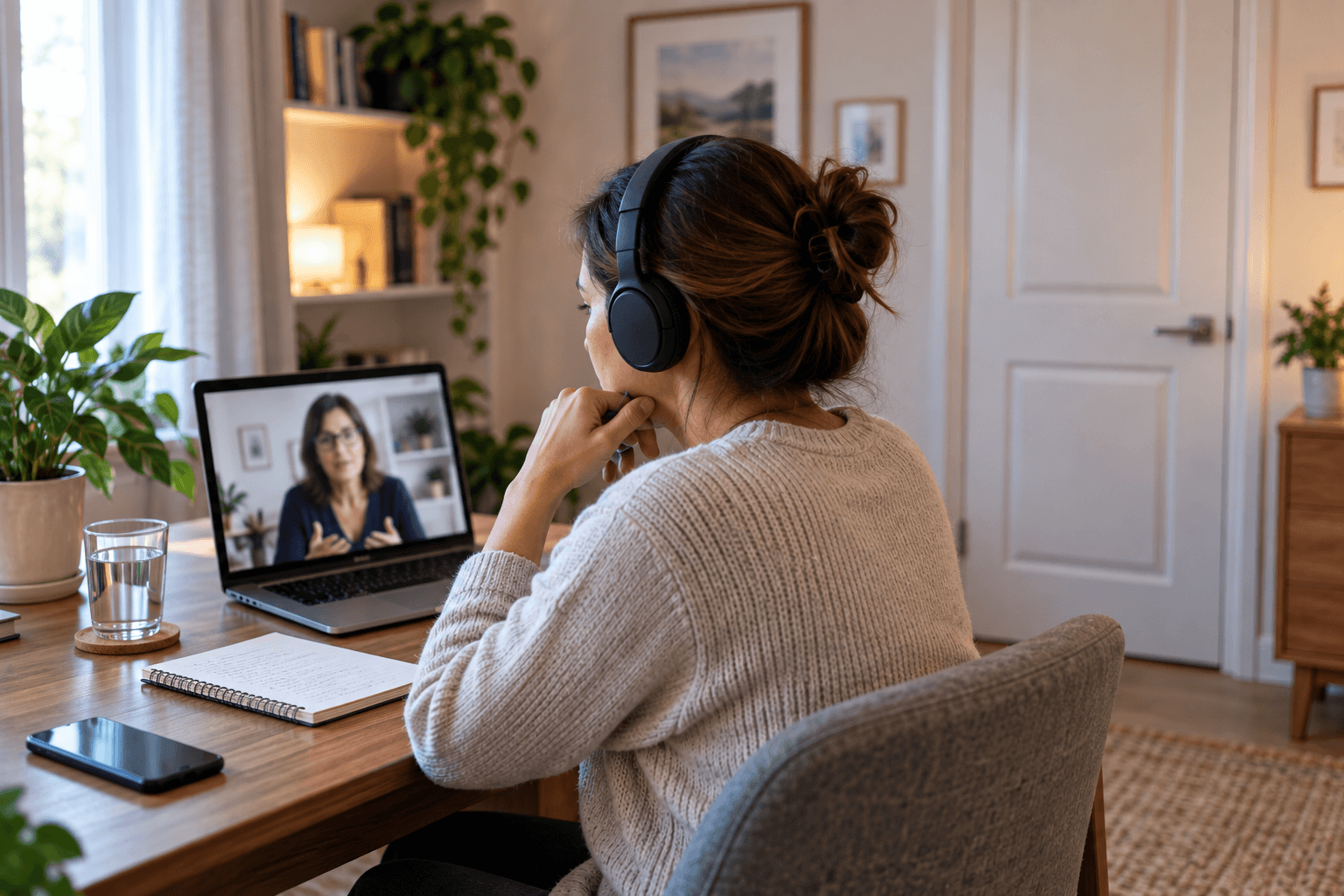
Online counselling can make therapy more accessible by allowing you to speak with a counsellor without travelling to an office. You might join a session from home, during a break in your working day or from another suitable location where you feel comfortable talking. But convenience alone does not make a space suitable for counselling.
You may be discussing experiences, relationships or emotions that you would not want somebody in the next room to overhear. A television in the background can make it harder to concentrate. Notifications appearing on your screen can pull you out of an important conversation. Even knowing that someone could walk through the door at any moment may make you less comfortable saying what you really want to say.
If you are considering online counselling Ireland services, preparing your surroundings beforehand can make the experience feel more private, comfortable and focused. You do not need to recreate a therapist’s office in your bedroom or living room. The aim is much simpler: create a temporary space where you can give the conversation your attention and feel reasonably confident that you will not be unnecessarily interrupted.
Why Does Your Environment Matter During Online Counselling?
Where you sit can influence how comfortable you feel talking. Imagine trying to discuss something deeply personal while listening for footsteps outside your bedroom door. Even if nobody actually interrupts you, part of your attention remains focused on what is happening outside the session.
Compare that with sitting somewhere you know you are unlikely to be disturbed for the next hour. The second situation does not guarantee that counselling will feel easy. Difficult subjects can still be difficult. But you have removed one source of distraction and uncertainty.
A good space for online counselling does not need to look like a therapy room. It simply needs to give you enough privacy, comfort and separation from everyday distractions to speak as openly as you want to. Your environment should support the conversation rather than compete with it.
How Private Does Your Space Need to Be?
Ideally, choose somewhere other people cannot easily overhear or enter unexpectedly. A room with a door you can close is often preferable to an open-plan living area, kitchen or shared workspace. Think about sound as well as visibility.
Someone does not have to be standing beside you to hear a conversation through a thin wall or open doorway. If you live with other people, consider which room provides the greatest practical separation from where they are likely to be during your appointment.
Privacy also works in both directions. You should consider not only whether someone can hear you, but whether background conversations, televisions, children, pets or household activity are likely to interfere with what you hear from your counsellor.
The goal is not perfect silence. It is a setting where you can reasonably concentrate and speak without constantly monitoring the people around you.
What If You Don’t Have a Private Room?
Not everyone has a home office or spare bedroom. You may share accommodation, live with family or have children at home. That does not automatically mean online counselling is impossible, but it may require more planning. Start by thinking about time as well as place.
A bedroom may offer little privacy at 7 p.m. when everyone is home but be completely quiet earlier in the day. Similarly, a shared living space may become usable when other household members are out.
If possible, tell the people you live with that you have a private appointment and need uninterrupted time. You do not have to explain what the appointment is about if you would prefer not to. You might simply say that you need the room privately until a particular time.
Headphones can help prevent your counsellor’s side of the conversation from being heard, although they cannot prevent other people from hearing what you say. Soft furnishings, curtains and carpets may reduce how easily sound travels compared with a very bare room, but they should not be relied upon as a guarantee of confidentiality.
If privacy at home is genuinely difficult, discuss this with your counsellor before the session. There may be practical options worth considering based on your circumstances. Privacy does not always mean finding the perfect room. Sometimes it means finding the best combination of place, timing and boundaries available to you.
Should You Use Headphones for Online Counselling?
Headphones are often useful. They can make your counsellor easier to hear, reduce distractions and prevent their side of the conversation from playing through your computer or phone speakers. That can be particularly helpful if other people are elsewhere in the property.
Choose headphones you can wear comfortably for the duration of the session. A device that becomes uncomfortable after ten minutes can turn into another distraction.
Test the microphone too. Some headphones have built-in microphones that produce clearer audio than a laptop microphone, while others may not. A quick test before the appointment can prevent you from spending the first several minutes trying to work out why your counsellor cannot hear you.
Remember that headphones solve only one side of the privacy issue. They can stop other people from hearing your counsellor, but they cannot stop them from hearing you. Your physical location therefore remains important.
Where Should You Position Your Computer or Phone?
Choose a stable position that allows you to sit naturally. Holding a phone in your hand for an entire counselling session can become tiring. You may also find yourself concentrating on keeping yourself in the frame rather than on the conversation.
If you are using a phone or tablet, place it on a stable surface or stand where possible. A laptop can usually sit on a desk or table, although you may need to adjust its height so the camera is reasonably close to eye level.
You do not need studio-quality framing. Your counsellor simply needs to be able to see and hear you adequately if video is being used. Try to position yourself somewhere you can remain reasonably comfortable without constantly moving the device.
Does Your Camera Background Matter?
Think about this not because your room needs to look impressive, but because there might be some things visible behind you that make you uncomfortable. Remember that your counsellor is not assessing your interior design.
Perhaps family photographs are visible. Maybe personal documents are sitting on a shelf. If you are joining the session from work, confidential information could be displayed behind you.
Take a moment to look at what your camera can see before the session begins. You may simply need to move the laptop slightly or sit facing another direction.
Virtual backgrounds can sometimes be useful, but they are not essential. They can also behave unpredictably when you move, so a plain or ordinary real background may feel less distracting. The best background is usually the one you can forget about once the conversation starts.
What Kind of Lighting Is Best?
Your face should be reasonably visible without the light being uncomfortable. Natural daylight can work well, particularly if you sit facing or at an angle to a window rather than placing a bright window directly behind you. At night, a normal room light or lamp may be enough.
Avoid worrying about creating flattering video-call lighting. Counselling is not a presentation or job interview. The purpose of lighting is simply to allow comfortable communication.
If staring at your own image makes you self-conscious, check whether the platform allows you to minimise or hide your self-view while remaining visible to your counsellor. For some people, not continually watching themselves on screen makes the conversation feel more natural.
Should You Sit at a Desk or Somewhere More Comfortable?
There is no universal rule. Some people concentrate better at a desk. Others feel more comfortable in an armchair. Choose somewhere supportive enough that physical discomfort is unlikely to distract you.
A bed may feel comfortable initially but could also make the session feel less separate from the rest of your day. For other people, however, a bedroom may be the only genuinely private room available.
Practicality matters more than creating an idealised counselling environment. One useful question is: “Where can I sit for the entire session without needing to think about where I am sitting?” That is usually a good place to start.
How Can You Make the Space Feel Separate From Everyday Life?
One challenge of online counselling is that therapy can happen in the same place where you work, eat, watch television or answer emails. There is no physical journey to a counselling room to mark the transition.
Creating a small routine before your appointment can help provide that separation. You might close your work applications, clear unnecessary items from the desk, get a glass of water and spend a few quiet minutes before joining the call.
You do not need candles, calming music or a carefully designed ritual unless those things genuinely help you. The objective is simply to give yourself a transition from whatever you were doing beforehand. When counselling happens at home, a few minutes of preparation can create a psychological boundary even when there is no physical journey to the session.
What Should You Do With Your Phone and Notifications?
If you are not using your phone for the session, consider putting it on silent or using a suitable do-not-disturb setting. Computer notifications deserve attention too. Email alerts, work messages, news notifications and social media can appear unexpectedly during a session. Even if you do not respond, seeing a message from your manager or a family member can immediately change where your attention goes.
Close unnecessary applications and browser tabs before you begin. If you are using the same computer for work, check whether workplace communication tools are still running in the background. You are essentially creating an appointment in which the person speaking to you deserves your attention, just as they would if you were sitting together in a counselling room.
Should You Check Your Internet Connection Beforehand?
Yes, particularly before your first appointment. You do not need to become a technical expert. Simply make sure the device you intend to use can connect reliably from the room you have chosen. A room can be wonderfully private but frustrating for counselling if the Wi-Fi connection repeatedly drops.
If possible, test the video platform beforehand. Check that your camera, microphone and headphones are recognised and that your device has enough battery power. Keeping a charger nearby can also be useful.
Ask your counsellor what to do if the connection fails. For example, you may agree beforehand on whether you should attempt to reconnect or use another agreed method of communication. Having a simple backup plan means a technical interruption does not need to become a stressful decision in the middle of a session.
What If Other People Are at Home?
This is common and worth planning for rather than simply hoping nobody interrupts. Tell household members when you need privacy and approximately when you will be available again. If appropriate, close the door and use a simple sign or other agreed signal to show that you should not be disturbed.
Parents and carers may face additional challenges because interruptions cannot always be prevented. If you are responsible for a young child or someone else who may need you unexpectedly, consider whether another responsible adult can help during the appointment.
Pets can interrupt sessions too. A dog scratching at the door or a cat walking across the keyboard may be amusing once, but repeated interruptions can make it difficult to remain focused. The goal is not to create an unnaturally controlled environment. It is to deal with predictable interruptions before they happen where reasonably possible.
What If Someone Interrupts Your Online Counselling Session?
An interruption does not mean the session has failed. Someone may knock on the door. A child may come in unexpectedly. A delivery may arrive. If that happens, tell your counsellor and deal with the situation as necessary. You can then decide whether you feel comfortable continuing once privacy has been restored. What matters more is whether interruptions are occasional accidents or a constant possibility that prevents you from speaking freely.
If you repeatedly find yourself lowering your voice, changing the subject or checking the door, the location may not be providing enough privacy for meaningful conversation. That is worth discussing with your counsellor. Together, you may be able to think about a different time, location or arrangement for future sessions.
Should You Keep Notes During Online Counselling?
You can if you find them useful, but you do not have to. Some people like to write down thoughts, questions or topics they want to discuss before a session. Others prefer to concentrate entirely on the conversation.
If you keep counselling notes, think about where they will be stored afterwards. A notebook left on a shared kitchen table may not provide the privacy you intended. The same principle applies to digital notes.
Consider whether other people have access to the device or account where you save them. This is an easily overlooked part of preparing for online counselling Ireland sessions: privacy is not limited to what happens during the video call. It can also include what you do with personal information before and afterwards.
What About Privacy on a Work Computer?
Where possible, a personal device may give you greater control over your privacy than a computer owned or managed by your employer. Work devices may be subject to organisational policies, security controls or monitoring arrangements that you do not control. The same applies to workplace Wi-Fi and physical office environments.
If you are considering attending online counselling during a working day, think carefully about both the location and the technology you intend to use. A private meeting room may prevent colleagues from walking in, but it does not necessarily answer every question about digital privacy. If you are unsure about the technology used for your counselling sessions, ask the counselling provider how their online appointments are conducted and what you need on your end.
Is a Parked Car a Good Place for Online Counselling?
Some people consider using a parked car because it may provide more privacy than their home or workplace. It can sometimes offer physical separation, but there are practical considerations.
You need a safe and legal place to park where you will not need to move the vehicle during the appointment. Mobile reception or internet connectivity needs to be reliable. Temperature, lighting and comfort may also become issues.
You should never participate in a counselling session while driving. A parked car may work for some circumstances, but it should not automatically be treated as the ideal private alternative. If you are struggling to find an appropriate location, it may be better to discuss the difficulty with your counsellor rather than trying to improvise a setting that leaves you uncomfortable.
Why Should You Give Yourself Time Before the Session?
Joining your counselling appointment immediately after finishing a stressful work call can make the transition difficult. You may technically be present while your thoughts are still somewhere else. Even five or ten minutes can help. Use that time to go to the bathroom, get some water, check your technology and settle into the space.
You might also think briefly about whether anything has happened since the previous session that you particularly want to discuss. There is no need to prepare an agenda unless that helps you. The purpose is simply to arrive mentally as well as digitally.
Why Does Privacy After the Session Matter Too?
This is one of the easiest aspects of online counselling to overlook. You carefully arrange an uninterrupted hour. The session ends. Thirty seconds later, your partner walks into the room asking what you want for dinner, your children need something, or you immediately rejoin a work meeting. That transition can feel abrupt, particularly after an emotionally demanding conversation. If possible, leave yourself a little time afterwards.
You might sit quietly, make a cup of tea, go for a short walk or simply avoid scheduling another demanding task immediately. You do not need a lengthy recovery period after every counselling session. Some appointments may feel relatively light. But having a small buffer gives you the option when you need it.
Privacy after counselling is not only about preventing someone from overhearing you. It can also mean giving yourself enough space to process the conversation before returning to everyone else’s demands.
What Should You Have Beside You During a Session?
Keep it simple. A glass of water can be useful. Tissues may be worth having nearby even if you do not expect to need them. If you take notes, have your notebook and pen ready beforehand.
Avoid surrounding yourself with unnecessary distractions. You probably do not need your work phone, television remote and several open browser windows within reach.
If there is something that helps you feel grounded or comfortable, it can be nearby as long as it does not distract you from the conversation. Again, you are not trying to build a professional therapy room. You are making the space work for you.
A 10-Minute Checklist Before Your Online Counselling Session
You should not need an elaborate preparation routine. About ten minutes before your appointment, consider checking the following:
- Is the room as private as I can reasonably make it?
- Do the people around me know I should not be interrupted?
- Can anyone easily overhear my side of the conversation?
- Are my headphones, microphone and camera working?
- Is my internet connection reliable in this room?
- Is my device charged or connected to power?
- Have I closed unnecessary apps and silenced notifications?
- Is there anything visible on camera that I would rather keep private?
- Do I have water, tissues or anything else I may need?
- Do I know what to do if the connection drops?
- Can I give myself a few minutes after the session before returning to other responsibilities?
You do not need every condition to be perfect.
The checklist is simply a way of removing avoidable distractions so you can focus on why you arranged the appointment in the first place.
Creating a Space Where You Can Focus on the Conversation
The advantage of online counselling is that you can access support without being in the same physical room as your counsellor. The challenge is that you become partly responsible for creating the environment in which that conversation happens.
Fortunately, that environment does not need to be complicated. Choose the most private location realistically available to you. Think about who might overhear or interrupt. Use headphones where helpful. Silence notifications. Test your technology and give yourself a few minutes on either side of the appointment. Most importantly, notice whether the environment allows you to speak comfortably.
If you are spending the session whispering, watching the door or worrying about who can hear you, tell your counsellor. Privacy difficulties are practical problems worth discussing, not something you have to quietly work around. For people considering online counselling Ireland services, a little preparation can make the transition from everyday life into counselling feel clearer and more comfortable.
If you are considering online counselling and have questions about preparing for private sessions at home, online counselling Ireland services may offer a convenient way to access support. Contact us on 01 524 0708 or click here if you have queries about online counselling. Speaking with a suitably qualified counsellor can help you understand how online sessions work and whether they are appropriate for your circumstances.